Between the three of us we use Dot, Muse and Grok Bot, and most days more than one of them. Each is good on its own. None of them knows what the others were told.
That got old quickly. Pranav would log meals with Dot, then have to tell Muse the same things again. Roshan only knew what Afshal had finished on their school project by messaging to ask.
So for Graph Hacks we built Memspace: one memory any of your assistants can read and write, which you can share pieces of with the people you work with. This post covers what it does, and spends most of its time on the two things underneath it, an ontology and FalkorDB.
01Two prompts and an MCP server
Memspace is a remote MCP server. Any assistant that can connect to MCP with OAuth can use it. We've run it with Dot from OpenAI, Muse from Meta, Grok Bot from xAI, and Codex.
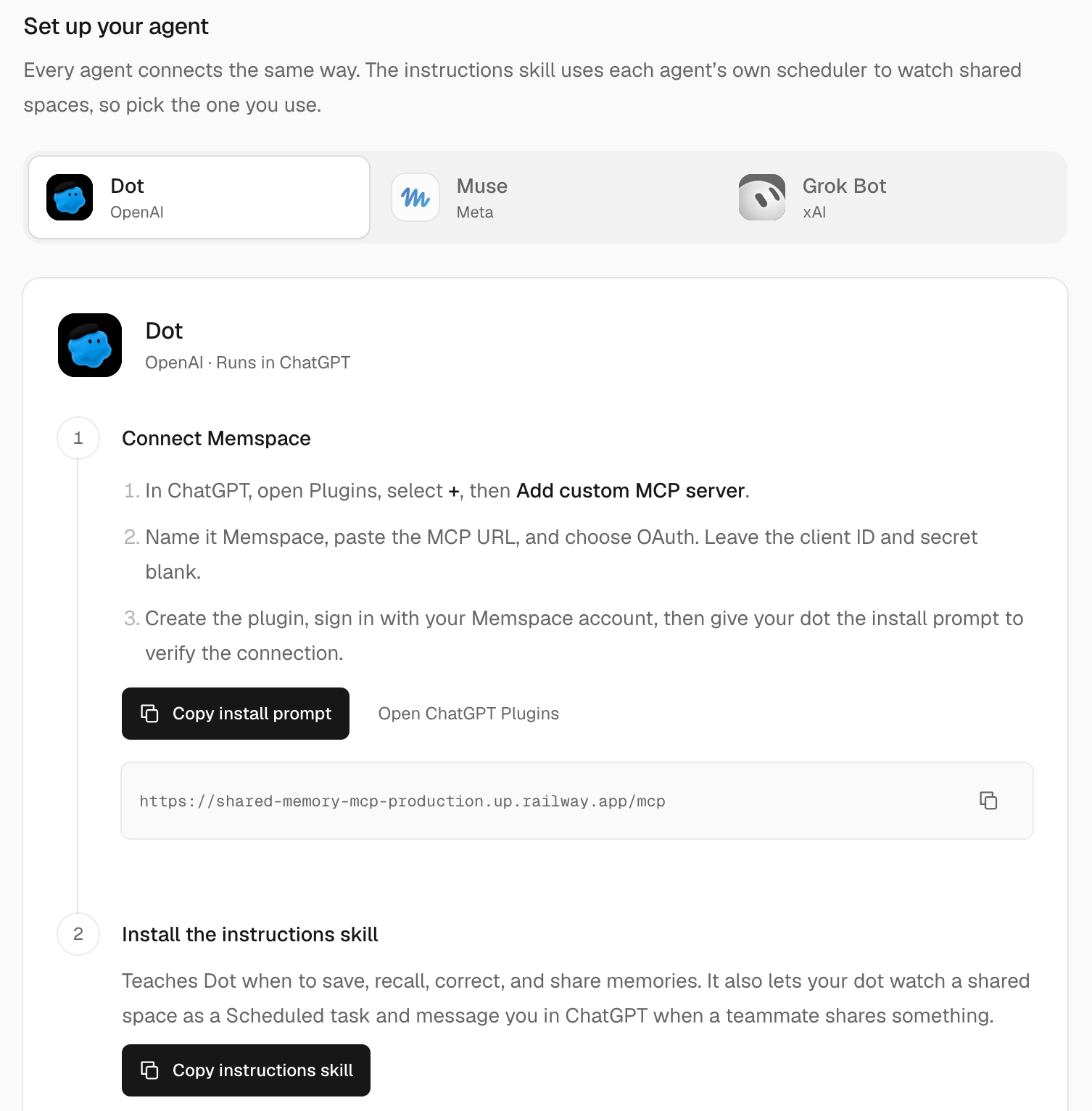
Setup is the same everywhere. You sign up on the dashboard, open Connections, pick your assistant, and follow three steps:
-
1
Add the server
Paste the Memspace MCP URL into your assistant and sign in with OAuth. No client secret, just your Memspace account.
-
2
Paste the install prompt
The assistant checks the connection by calling
get_connection_status. Signing in through a browser isn't proof; a working tool call is. -
3
Paste the instructions skill
It teaches the assistant when to save, recall, correct and share, and how to set up a timed check in its own scheduler.
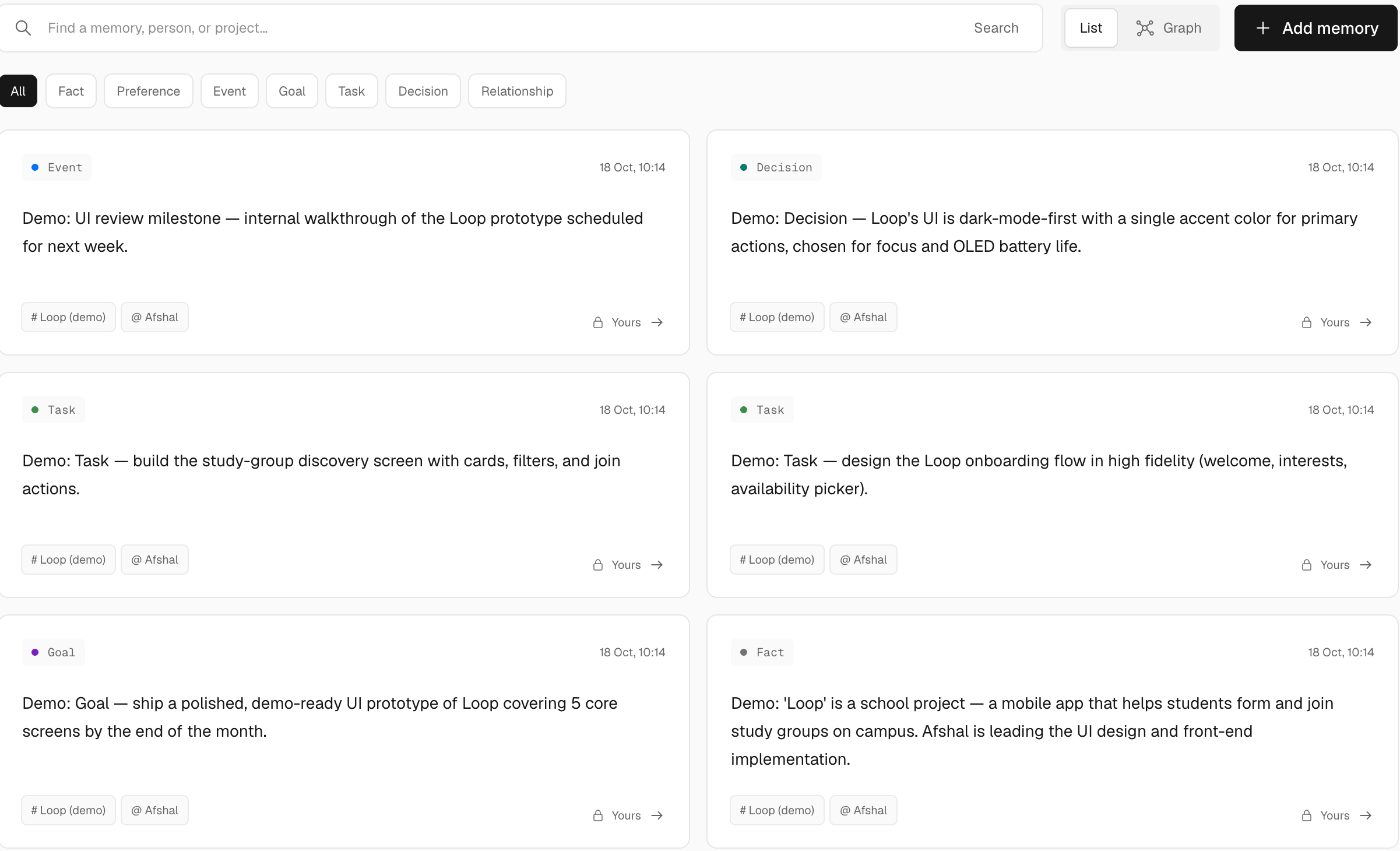
After that you talk to your assistant like you always did. It saves what's worth keeping and tells you when it has. Everything any of your assistants saved shows up in one list, typed, and private until you share it.
02Your assistants, finally caught up
Here's the first thing we wanted. Pranav uses Dot as a food log, and asked it to save yesterday's meals to Memspace, then to do the same every night at 10pm.
Muse had the same skill installed, plus a personal watch: a scheduled task that checks Memspace every 10 minutes for anything Pranav's other assistants saved. The next morning Muse already knew what Pranav had eaten the day before, popcorn included, without being told.

Add what I ate yesterday to my personal shared memory.
Saved yesterday's food intake, October 17, to your private shared memory, including the popcorn.
Do this every night at 10pm.
Set for 10pm Pacific every night. Each day's summary will be saved privately.

Dot saved your food log for October 17: a whey shake, chicken for lunch and dinner, and a medium popcorn. Roughly 2,700 calories and 178g of protein.
The trick is small. When an assistant connects, Memspace gives it its own client ID, and every memory remembers which assistant saved it. A personal watch only reports memories saved by a different assistant, so Muse never tells Pranav about something it saved itself.
The checks run in each assistant's own scheduler: a Scheduled task in Dot, a cron job in Muse, a routine in Grok Bot. You pick how often, anywhere from every 5 minutes to once a day.
03Your teammates' assistants, too
The second thing is the one we were most excited about. Roshan and Afshal are building a school project together, an app called Loop. Roshan created a shared space for it on the dashboard, invited Afshal by email as a contributor, and sent the invite link over.
From then on Afshal could share individual memories into the space. Each share is a choice; the rest of their memory stays private. When Roshan sat down to work on the UI, the first stop was one question to Grok Bot.
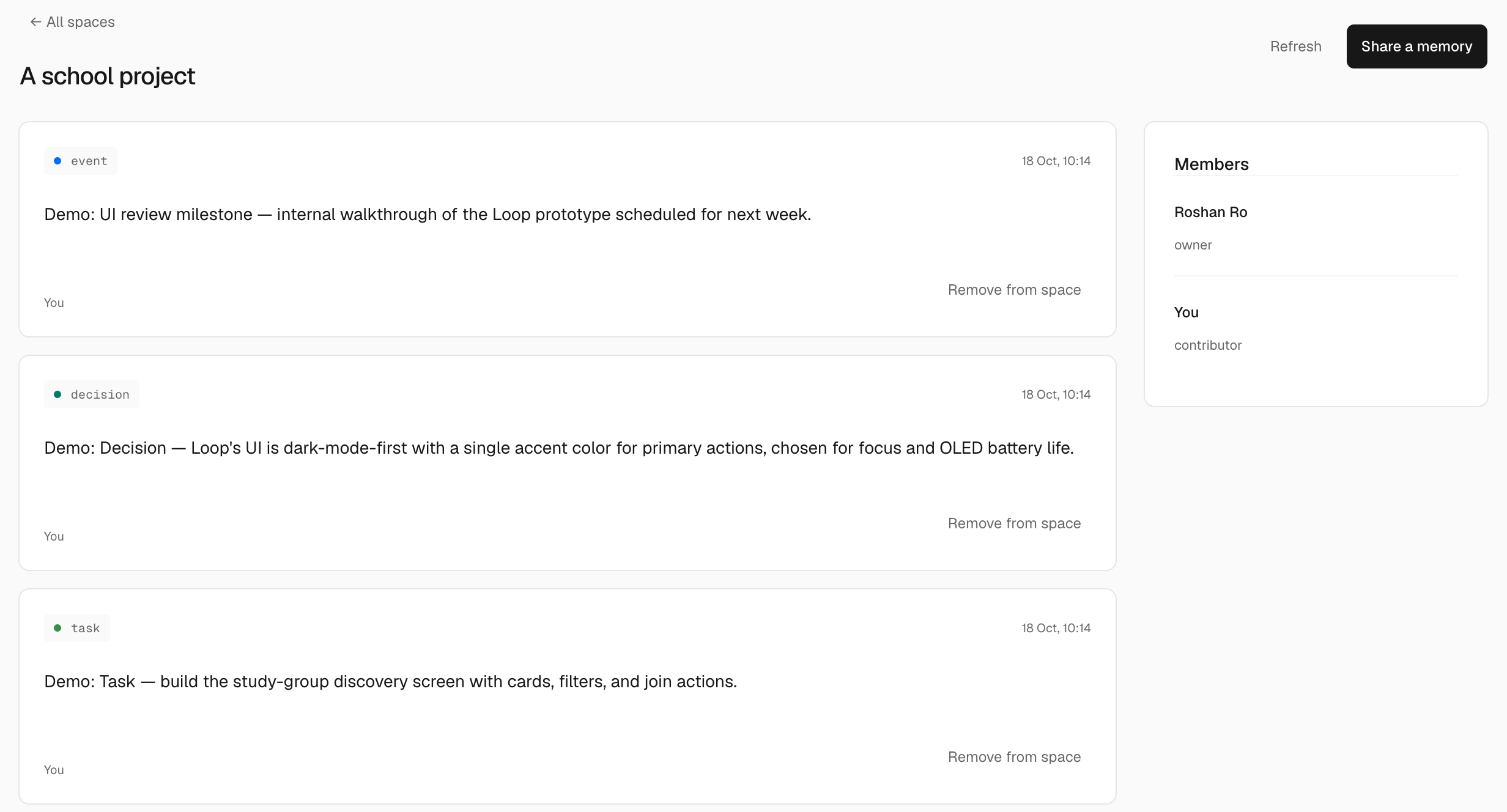

What has Afshal been doing for the project?
Afshal is leading Loop's UI design and front-end work. The aim is a demo-ready prototype covering 5 core screens by the end of October. They've planned an onboarding flow and a study-group discovery screen, which is still marked proposed, and decided the UI will be dark-mode-first with a single accent colour.
So Roshan picked something else to build. No meeting, no "hey, what are you working on?" message. That answer came from facts, not a chat transcript, which brings us to the part of Memspace we spent the most time on.
04Under the hood: an ontology
An ontology is a shared model of a world: the kinds of things in it, how they can relate, and the rules for connecting them. Large companies use them for exactly this. A customer, an order and a supplier stop being rows in three different systems and become things with known relationships, so the people and the software are working from the same facts.
We wanted that for someone's personal life. Your assistants don't need a pile of old chats. They need to know that Afshal works on Loop, that a decision was made, who made it, and what's still only proposed.
People and places
Who and where. A name never links to someone's account.
Work
Efforts, work items, outcomes and the choices behind them.
Everyday life
One-off events, recurring habits, and preferences in context.
Things and money
What you own or use, and who owes what to whom.
The relationships are narrow on purpose. WORKS_AT means reported employment, not a job you want. ASSIGNED_TO doesn't mean the person accepted the task; that's ACCEPTED_BY. Visiting somewhere isn't LIVES_IN. These distinctions look fussy on paper. They're also exactly where a vaguer memory system would quietly invent facts about you.
One sentence, broken into facts
When you tell an assistant something, it calls remember. Memspace saves the note straight away. In the same write it queues a job, and a worker hands the note and the schema to a model (GPT-4.1 mini) with one request: return facts that fit. Every fact has to name a type and a relationship from the schema and quote the exact words it came from. If it doesn't validate, it's dropped and counted.
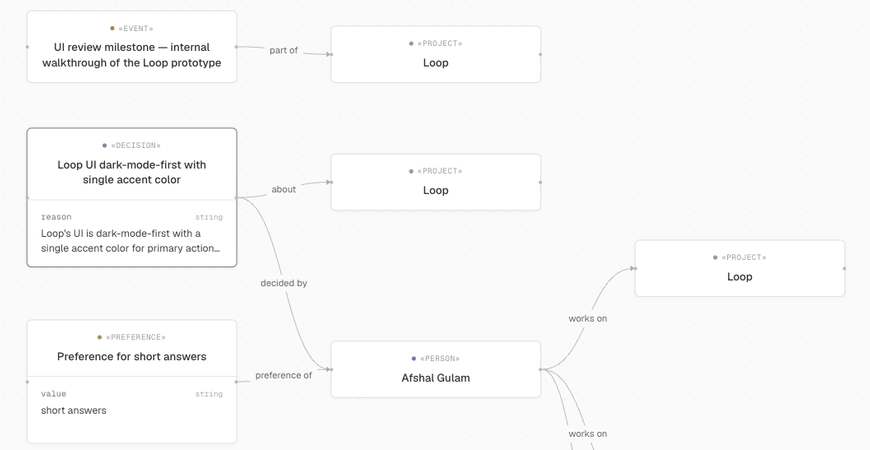
Afshal, to Muse I'm leading the UI design for Loop1. We decided it'll be dark-mode-first with a single accent colour2. I want a demo-ready prototype of the 5 core screens3. Maybe we'll add a light theme later4.
- 1 personAfshal Gulam works on projectLoop
-
2
decisionDark-mode-first UI
decided by
personAfshal Gulam
plus: about → Loop, and the choice itself as a value
- 3 personAfshal Gulam wants goalDemo-ready prototype, 5 screens
-
4
no fact
"Maybe" is a hypothetical. It stays in the note and never becomes a claim.
The model sees the author's own recent facts too, so "Loop" lines up with the Loop it already knows about instead of becoming a new project every time. It never sees anyone else's private graph.
Every fact keeps its receipt
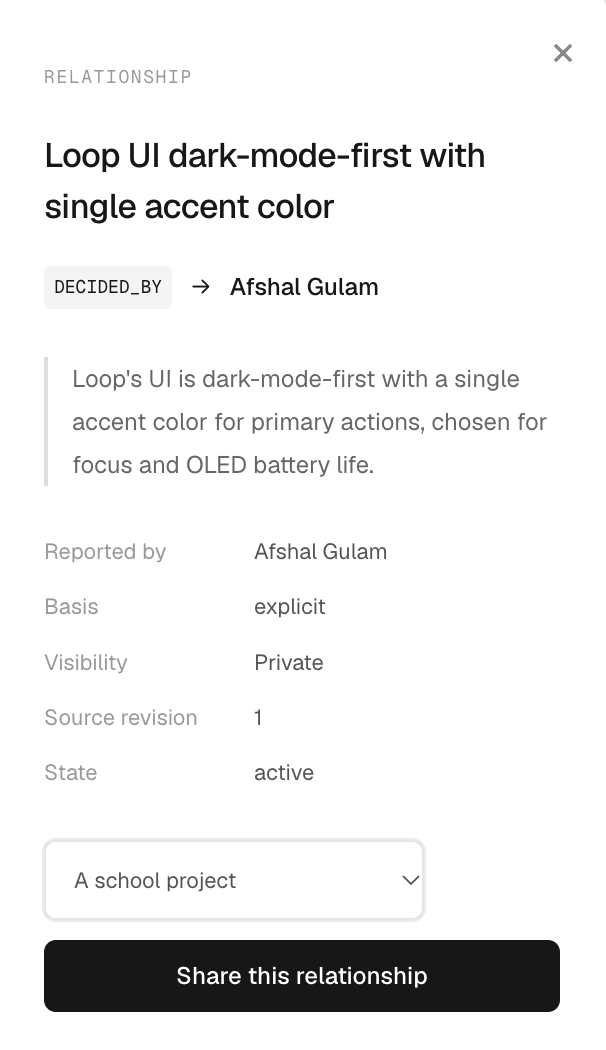
Click any line in the dashboard and you get the sentence it came from, who said it, whether it's private or a shared snapshot, and which version of the note it belongs to. If the note gets corrected, the old facts drop out of normal results but stay in the history. If it's forgotten, its facts and anything shared from them go with it.
Negatives stay negative
"Pranav can't speak Tamil" is a fact too. Plenty of memory tools drop sentences like that, or worse, keep the positive half. We store the claim with negated: true, and the dashboard draws it in red as "not has skill".
The model is told to negate only what the note actually denies. "Doesn't drink coffee" isn't a negated dislike of coffee, and "Lee owes me" never turns into "I don't owe Lee".
Pranav, to DotI can't speak Tamil.
HAS_SKILL, exactly how it shows up in the dashboard graph.When nothing fits, it asks
Forty-nine relationships don't cover everything people say. When the extraction can't find one that fits, it can propose a new one instead of forcing the fact into the wrong shape.
Extraction suggests a new relationship
Say someone writes "Roshan mentors two first-years". Nothing in the schema fits, so the model proposes MENTORS, from person to person. At most three per note.
Usable straight away
The fact is stored and searchable. Later notes reuse MENTORS instead of inventing COACHES; names with the same root, like SPEAKS and CAN_SPEAK, collapse into one.
A person decides
Teammates meet at one node
Private graphs are never merged. Your "Afshal" and Roshan's "Afshal" are separate nodes, because a matching name isn't proof it's the same person.
Shared spaces are different, because there we know exactly who the members are. When a shared fact mentions a person and the name matches exactly one member (their full name, a first name nobody else in the space has, or the author talking about themselves), it points at that member's node. If two members are called Alex, it links to neither.
Afshal is handling the Loop UI.
mentions "Afshal"I'm designing the onboarding flow for Loop.
mentions "I"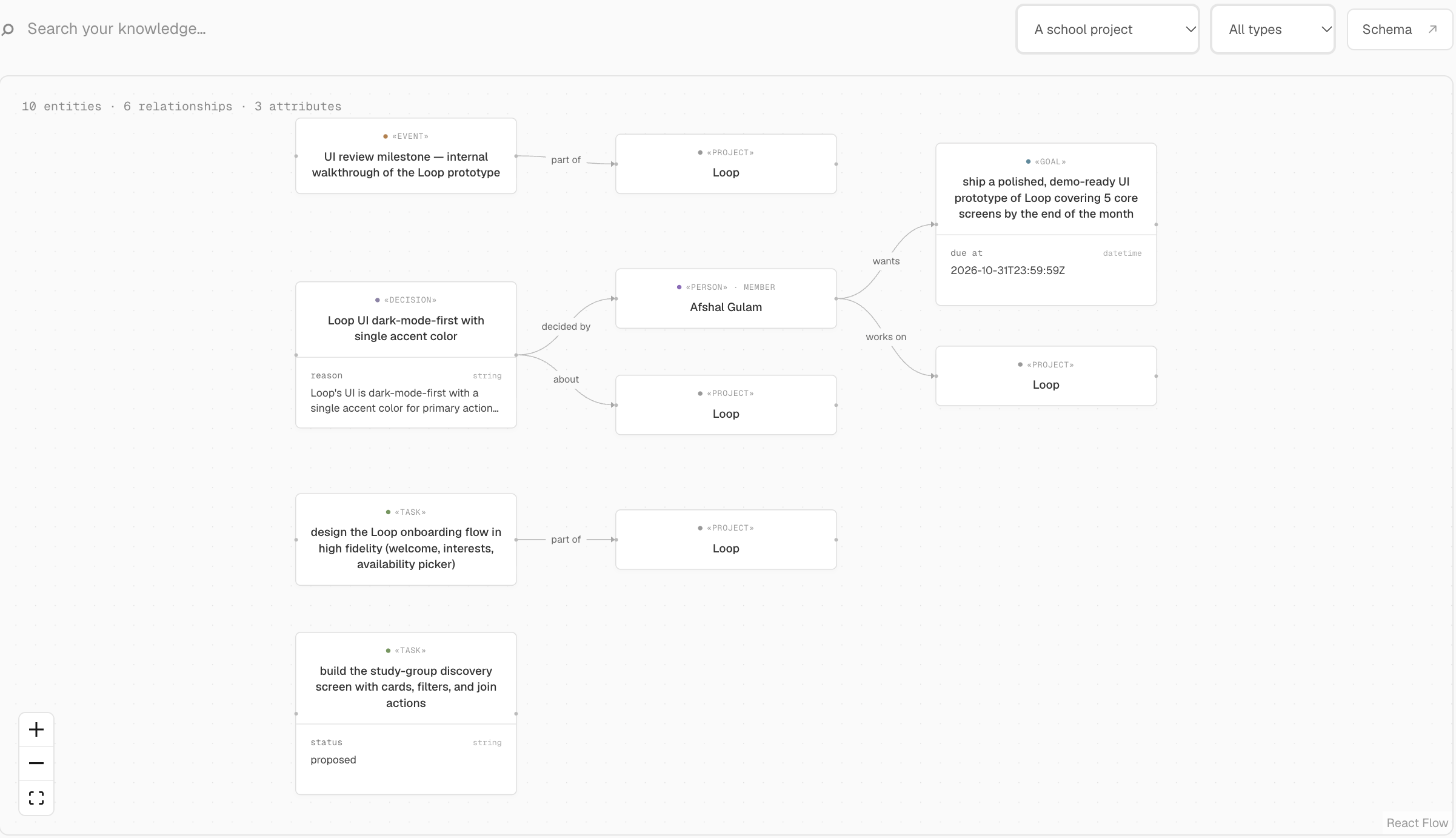
05Why it all lives in FalkorDB
Every part of Memspace is one FalkorDB graph: people, memories and their versions, shared spaces, every fact, the search indexes, and even the queue of extraction jobs.
FalkorDB is a graph database. It stores data as nodes and the relationships between them, you query it with Cypher, and it has full-text and vector search built in. That last part mattered more than we expected. Three things in Memspace can't work without it.
Permissions are paths
There's no access table. You can read a memory if you wrote it or a live path reaches it through a space. Removing a member flips one edge, and their next read comes back empty.
Recall follows relationships
Recall finds keyword matches, then hops one edge through the people, projects and spaces they mention. It returns related notes that share no words with the question, and says what connected them.
Search runs inside the graph
Facts are found by full-text and by meaning (768-dimension vectors in an HNSW index), merged by rank, and every hit is checked against the same permission path before you see it.
Here is the permission check itself. It's appended to every memory read, and to every hop recall takes:
MATCH (m:Memory {id:$id})
OPTIONAL MATCH (m)-[:SHARED_IN {active:true}]->(:Space)
               <-[membership:MEMBER_OF {active:true}]-(:Person {id:$user})
WITH m, count(membership) AS memberships
WHERE m.deletedAt IS NULL AND (m.owner = $user OR memberships > 0)
RETURN m
FalkorDB plans it as an index lookup on the memory followed by two traversals to the reader, so its cost depends on that memory's own connections, not on how big the graph is. Each person and each space also gets its own search index, so someone else's vectors never crowd yours out of the results.
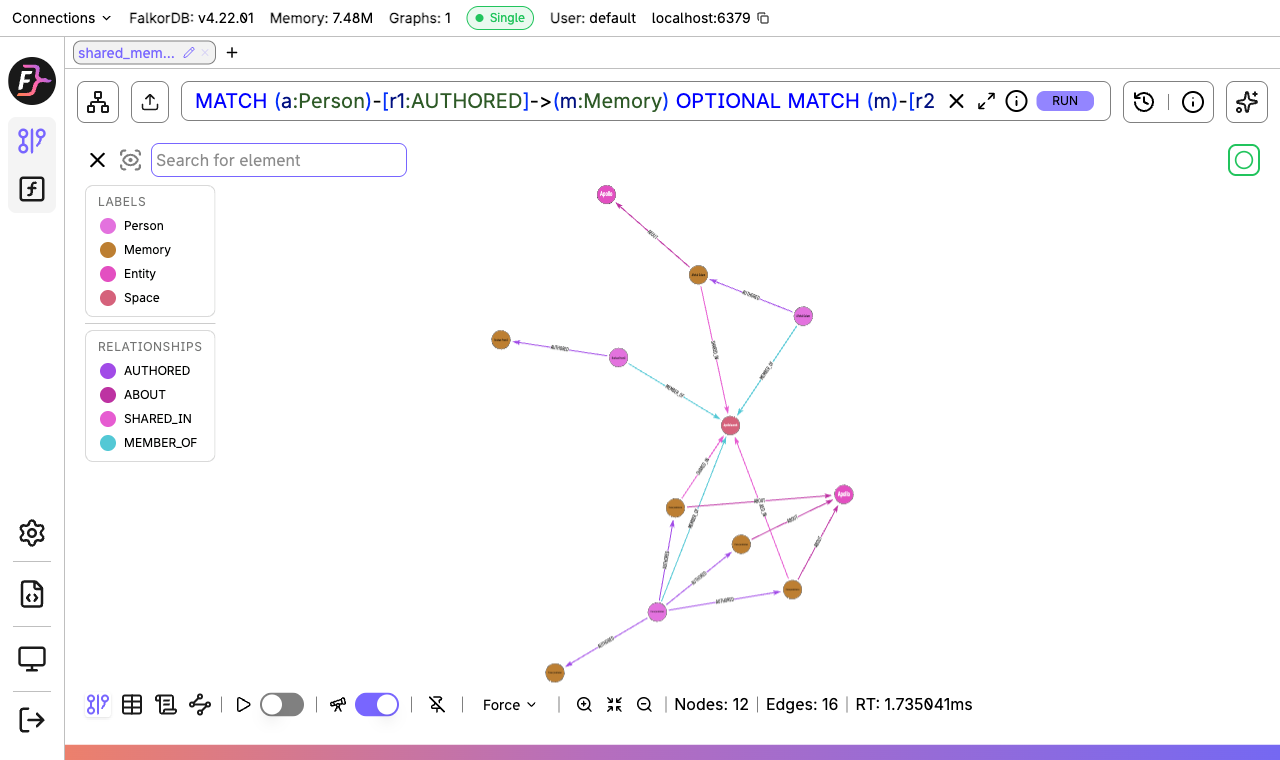
npm run graph:demo in the repo builds it through the product's own code.06What we learned
Pushing to assistants didn't work out
Our first version tried to notify teammates' assistants with webhooks. Every host handles them differently, and we pulled it out. Letting each assistant check on its own schedule turned out simpler, and the assistant is the one that knows how it wants to be woken.
Names are a trap
Merging people by name is tempting until you picture two Alexes in one space. In Memspace a name links to a person only inside a space, and only when exactly one member matches.
Make the model quote
Every fact has to carry the exact words it came from, or it's dropped. A quote doesn't prove the model read the sentence right, but it gives you something to check. On our eight synthetic test cases GPT-4.1 mini got all eight, in 0.6 to 7.3 seconds each. Eight cases is a regression check, not a benchmark.
Read the database's fine print
FalkorDB's vector search returns a distance in a column called score, so lower is better. A newer version rejected an inline {id:$space} right after an index call. The full list is here.
Some things are still rough
The same project mentioned in four separate notes can show up as four "Loop" nodes, because we'd rather leave them apart than merge on a guess. Recall only expands one hop. Its first step still scans every memory.
Dates are harder than they look
In our demo space, "end of the month" was stored as 23:59 UTC on October 31, a time zone nobody gave. Grok Bot noticed and said so while summarizing the space. The extraction rules tell the model to leave relative dates vague rather than invent a timestamp.
07Try it
Memspace is live and the code is open. Sign up, connect whichever assistant you use, and tell it something worth remembering.
- Live app, with the MCP endpoint at
/mcp - Source on GitHub, including the Cypher queries and a runnable graph demo
- The demo video
We built this for FalkorDB's Graph Hacks, in the Agent Memory and Coordination track. If you try it and something breaks, open an issue. We'd like to hear about it.